IN A TEXT
Church volunteer sign-ups by text
Volunteers choose a slot by replying to a text, get a confirmation and reminders—no links or apps. You get a clear roster and less chasing.
Church volunteer sign-ups by text let your team claim shifts, roles, or spots in the same conversation. GroupText tracks who signed up for what and can send check-in reminders so coverage is clear and no-shows drop.
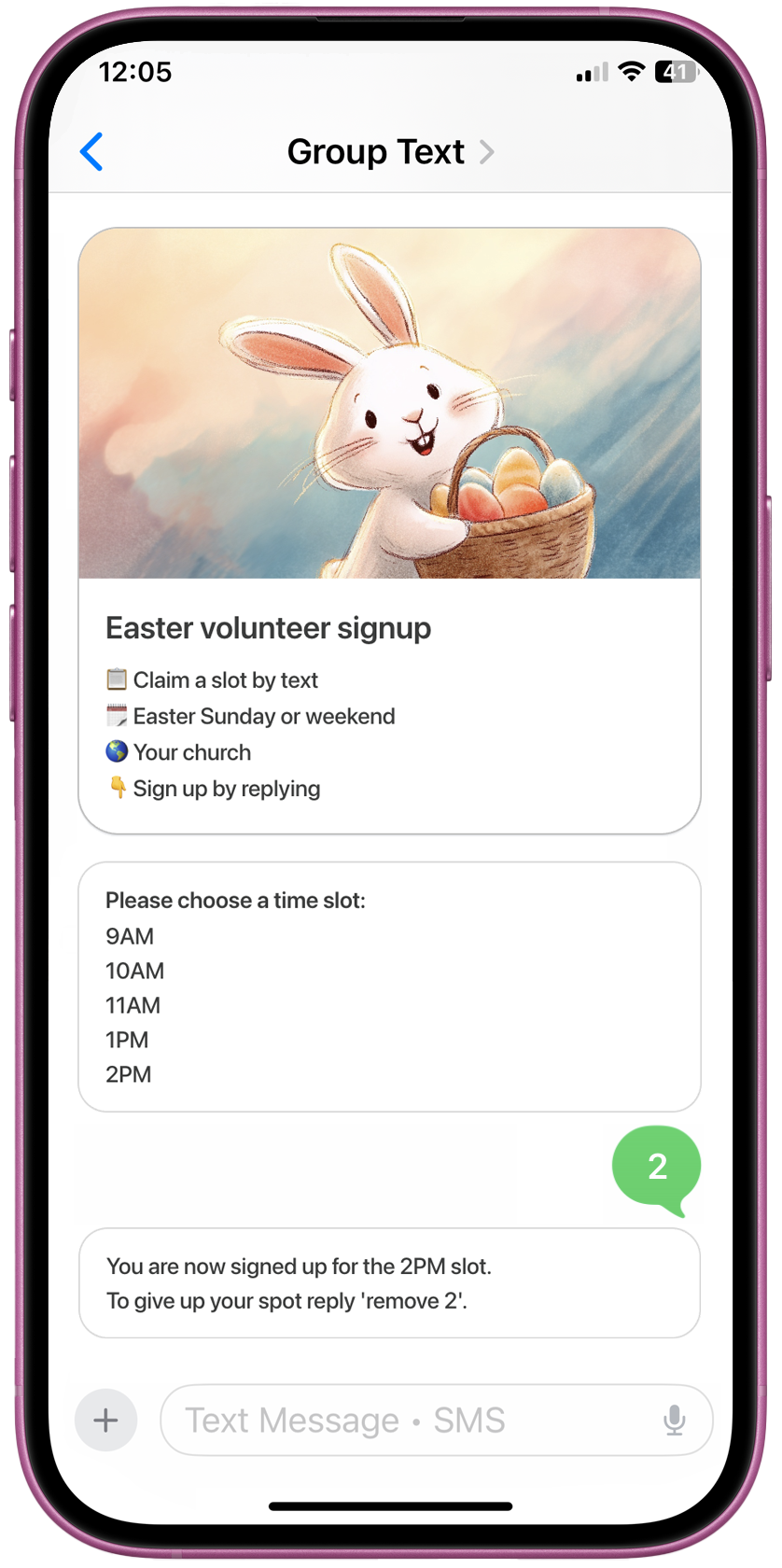
Church volunteer sign-ups by text mean volunteers choose a slot by replying to a text, get a confirmation and reminders, and can check in by text—no links or apps—so coordinators get a clear roster and spend less time chasing people.
What makes GroupText different?
Most church sign-up tools rely on links and email—volunteers forget to click or never open the form. GroupText keeps the sign-up in the text thread, so people reply quickly and you get confirmations and reminders without the extra steps.
| Text-first | Link-first | |
|---|---|---|
| Claim a slot | Reply in the same text thread | Click link, open form, submit |
| Confirmations | Instant by text | Often email or separate tool |
| Reminders | Automatic text reminders | Often manual or email |
| Organizer follow-up | Less chasing | More chasing |
| Best for | Busy volunteers, no app | Longer forms, desktop |
Built for busy volunteers
Reply in the same thread. No click, no form, no lost link. You get a clear roster and automatic reminders so coverage is predictable.
How church volunteer sign-ups by text work
You create slots, text the sign-up to your group, and volunteers claim one by replying. GroupText confirms and can remind them before their shift; you can add check-in by text so you always know who showed up.
- Create volunteer slots (shifts, roles, or spots) and set capacity.
- Text the sign-up to your ministry or team.
- Volunteers reply in the same thread to claim a slot (e.g. by number or keyword).
- GroupText confirms their choice and can send automatic reminders before their shift.
- Check-in by text when they arrive; you keep a clear roster in one place.
In five steps
1.
Create volunteer slots (shifts, roles, or spots) and set capacity.
2.
Text the sign-up to your ministry or team.
3.
Volunteers reply in the same thread to claim a slot (e.g. by number or keyword).
4.
GroupText confirms their choice and can send automatic reminders before their shift.
5.
Check-in by text when they arrive; you keep a clear roster in one place.
Why churches choose text-based volunteer signups
Text keeps sign-ups in a place volunteers already use, with confirmations and reminders in the same thread. The result: better response rates, a clear roster, and fewer no-shows.
Higher response rates
Volunteers see the sign-up in a thread they already use and can reply in seconds—no link to find or form to fill.
Clear roster, less chaos
GroupText tracks who took which slot and sends confirmations and reminders, so you get one clear list instead of spreadsheets or group chat scroll.
Fewer no-shows
Automatic reminders by text before a shift keep commitments top of mind without you having to chase people.
No app or account required
Volunteers use their normal messaging app; no download or login. Great for all ages and tech comfort levels.
Church volunteer sign-ups by text vs sign-up links
Link-based sign-ups work, but they add friction: volunteers must click, load a page, and complete the form. Text sign-ups keep the action in the conversation—reply to claim, get confirmed, get reminded—so organizers spend less time chasing.
| Sign up by text | Link-based | |
|---|---|---|
| Action to claim | Reply in text | Click link + form |
| Response speed | Faster | Slower |
| Reminder delivery | Text reminders | Often email |
| Organizer follow-up | Less | More |
| Best for | Busy volunteers, no app | Longer forms |
Less friction
Reply in the same thread. No click, no form, no lost link. You get a clear roster and automatic reminders.
What church teams can use sign-ups by text
Any ministry or team that fills slots or roles—Sunday service, nursery, meal trains, small groups, events, youth ministry, and more. If you need a clear roster and fewer no-shows, sign-ups by text fit.
- Sunday service (greeters, ushers, AV, kids)
- Nursery and children’s ministry
- Meal trains and care teams
- Small groups and hospitality
- Events and outreach
- Youth and student ministry
Church volunteer examples
Get a clear volunteer roster
Create a church volunteer sign-up and let people claim slots by replying to a text. No links. No apps. Fewer no-shows.
Church volunteer sign-ups by text FAQ
What are church volunteer sign-ups by text?
Church volunteer sign-ups by text let volunteers choose a slot (shift, role, or spot) by replying to a text message. They get a confirmation and optional reminders; no link to click and no app. The organizer gets a clear roster and can use check-in by text.
How do church volunteer sign-ups by text work?
You create slots (e.g. Sunday greeter 9am, nursery 11am), text the sign-up to your group, and volunteers reply in the same thread to claim one. GroupText records their choice, sends a confirmation, and can send reminders before their shift. You can also use check-in by text when they arrive.
Do volunteers need to click a link or use an app?
No. With church volunteer sign-ups by text, volunteers claim a slot by replying in the same text thread—for example, with a number or keyword. No link, no app download, and no account required. They use their normal messaging app.
Can we send automatic reminders for volunteer shifts?
Yes. GroupText can send automatic reminders by text before a shift or serving time. That reduces no-shows and saves coordinators from manually chasing people. Reminders go out in the same text-first workflow.
Is text better than a sign-up link for church volunteers?
For many church teams, yes. Link-based sign-ups add steps: open email, click link, load page, fill form. Text sign-ups keep everything in the conversation—volunteers reply quickly, and you get confirmations and reminders without the extra friction. That often means higher response rates and fewer no-shows.
What church teams can use sign-ups by text?
Any ministry or team that fills slots or roles: Sunday service (greeters, ushers, AV, kids), nursery and children’s ministry, meal trains, small groups, events, youth ministry, and outreach. If you need a clear roster and fewer no-shows, sign-ups by text can help.
Can we limit how many people sign up per slot?
Yes. When you create the sign-up, you can set capacity per slot (e.g. 2 greeters, 4 nursery). GroupText tracks who claimed what and can prevent overbooking. If a slot is full, volunteers can be prompted to choose another by text.
What if a volunteer is in more than one sign-up?
If you have multiple active sign-ups, GroupText can ask the volunteer to choose which one they mean—for example, by replying 1, 2, or 3. That keeps each sign-up separate and avoids confusion.
Is this better than a group chat for coordinating volunteers?
For structured sign-ups (shifts, roles, slots), yes. A group chat has no structure—you have to scroll and remember who said what. With sign-ups by text, GroupText tracks who took which slot and sends confirmations and reminders, so you get a clear roster without the chaos of a long thread.
Can volunteers check in by text when they arrive?
Yes. You can use check-in by text so volunteers confirm when they arrive (e.g. reply with a code or keyword). That gives you a simple attendance record and helps with coverage and follow-up.
Do we need special software or hardware?
No. GroupText works with standard text messaging. You create the sign-up and share it by text; volunteers reply from their phone. No extra software or hardware for your volunteers.
How do church volunteer sign-ups by text reduce no-shows?
They set clear expectations (role, time, place) and send automatic reminders by text before the shift. Volunteers get a confirmation and a reminder in the same thread they use to sign up, which makes commitments more visible and reliable.