IN A TEXT
Church invitations with RSVP by text
Invite church members by text and let them RSVP in the same conversation. No app to download. No RSVP link to chase. Just a faster way to get a clear headcount for church events.
RSVP in the same text thread
No app or login for guests
Faster headcount for church events
Send reminders by text
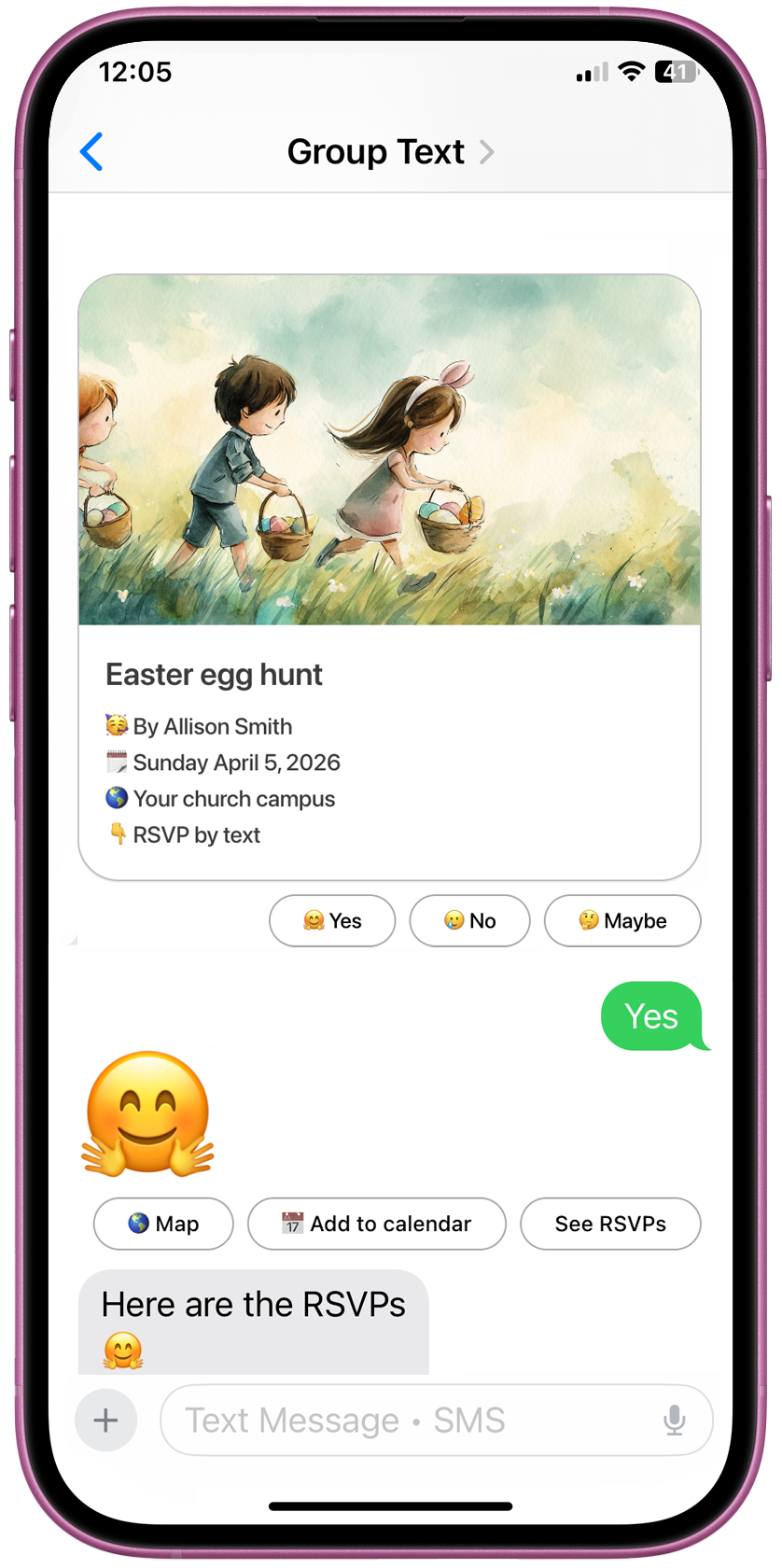
Yes — churches can send invitations by text and collect RSVPs in the same conversation. GroupText keeps the invitation image, replies, and reminders together in one thread, which reduces friction compared with email invites or link-based event pages.
Why use text invitations instead of email or event links for church events?
Text invites are easier for guests to notice and respond to because the invite and RSVP happen in a thread they already use, with fewer steps than email-and-link workflows.
| Text-first | Link-first | |
|---|---|---|
| RSVP experience | Reply in the same text thread | Click link, open form, submit |
| Guest setup | None. Reply in-thread. | Often: click link, sometimes account or app |
| Invite visibility | Photo invite visible in thread | Image behind link or in email |
| Headcount tracking | Yes/no/maybe in one place | Often separate dashboard or manual |
| Reminders | One reminder by text | Often separate email or tool |
| Best for | Church events, fast headcount | Longer forms, desktop |
Built for church events
Reply in the same thread. No click, no form, no lost link. You get a clear headcount and can send one reminder by text.
How church invitations with RSVP by text work
You send a photo invitation by text; members reply in the same conversation. GroupText tracks yes, no, and maybe in one place and can send one reminder before the event.
- Send a photo invitation by text — Create a church invitation with the image, event details, and RSVP options.
- Members reply in the same conversation — Guests respond by text instead of clicking out to another page.
- Track your headcount automatically — See who said yes, no, or maybe in one place.
- Send reminders by text — Follow up with one reminder before the event.
In four steps
1.
Send a photo invitation by text — Create a church invitation with the image, event details, and RSVP options.
2.
Members reply in the same conversation — Guests respond by text instead of clicking out to another page.
3.
Track your headcount automatically — See who said yes, no, or maybe in one place.
4.
Send reminders by text — Follow up with one reminder before the event.
Built for the church events that need a real headcount fast
Newcomer lunches, women's events, holiday services, and more—get a clear yes/no/maybe count without link-based RSVP friction.
Newcomer Lunch Invitations by Text
Invite first-time visitors and let them RSVP with a simple reply. Get a clearer headcount for lunch, seating, and follow-up without sending people to a separate RSVP page.
Better attendance visibility
Easy for guests who are new to the church
Simple reminders the week of the event
Women's Event Invitations by Text
For women's breakfasts, women's nights, seasonal gatherings, and special speakers, GroupText makes it easy to send a beautiful invite by text and collect RSVP replies in one thread.
Great for breakfasts, luncheons, and special nights
Easier than email chains or manual texting
Helps leaders get a real count for food and seating
Holiday Church RSVPs by Text
Use text RSVPs for Christmas services, candlelight gatherings, Easter events, holiday dinners, and special seasonal programs when turnout matters and reminders matter even more.
Better for special-event planning
Helps estimate attendance faster
Makes one reminder easy before the event
Why GroupText works better for church invites than email or link-based RSVP tools
Text thread simplicity beats fragmented RSVP flows. Church members reply where they already are—no link, no portal, no manual counting.
| Criteria | GroupText | Email + RSVP link | Group chat |
|---|---|---|---|
| Guest setup required | None. Reply in the same text thread. | Often: click link, sometimes create account or open app. | None, but host must track manually. |
| RSVP experience | Designed for text-first RSVP. Guests reply quickly in-thread. | Click link, fill form, sometimes multiple steps. | Guests type freely; no structured yes/no tracking. |
| Invite visibility | Photo invitation visible in the text thread. | Image usually behind a link or in email body. | Depends on how host shares; often lost in scroll. |
| Headcount tracking | Responses tracked in one place. Clear who said yes/no. | Depends on platform; often in a separate dashboard. | Manual; host scrolls and counts. |
| Reminder workflow | Send reminders by text from the same workflow. | Often separate email or tool. | Manual follow-up messages. |
| Friction level | Lower friction. No app download required for guests. | More steps: open email, click, load page, submit. | Low friction but no structure; tracking is slow. |
| Best for church admins | One place for invite, RSVPs, and reminders. | Multiple tools or manual tracking. | Manual counting and chasing. |
| Best for members who won't click a link | Yes — reply in the same thread. | No — they must click and fill a form. | Maybe — but no clear yes/no list. |
One thread for invite and RSVPs
Reply in the same conversation. No click, no form, no lost link. You get a clear headcount and can send one reminder by text.
What is a church invitation with RSVP by text?
A church invitation with RSVP by text is an event invitation sent by text message instead of email or a separate invitation website. With GroupText, church members receive the invite as a text, reply in the same conversation, and help organizers get a clear headcount without apps or link-based RSVP friction.
Can church members RSVP without clicking a link?
Yes. GroupText lets guests reply in the same conversation instead of visiting a separate RSVP page.
Do guests need an app?
No. Guests use their normal messaging app; no app download or account is required.
Can churches send reminders by text?
Yes. GroupText supports reminder workflows in the same text-based flow.
Is this better than group chat RSVP collection?
For getting a clear headcount, yes. Group chat has no structure—you scroll and count. With GroupText, yes/no/maybe are tracked in one place.
Church invitation templates with RSVP by text
Lead with these flagship categories, then browse more for men's events, volunteer appreciation, prayer nights, and more.
Newcomer Lunch
Women's Breakfast / Women's Night
Holiday Service RSVP
Men's Breakfast
Volunteer Appreciation Dinner
Prayer Night
Small Group Launch
Youth Night
VBS Parent Night
Frequently asked questions about church invitations with RSVP by text
FAQ
Can church members RSVP by text without clicking a link?
Yes. GroupText lets guests reply in the same conversation instead of visiting a separate RSVP page.
Do guests need to download an app?
No. Your current product messaging already says no app download is required for guests.
Can churches send reminders by text?
Yes. GroupText supports reminder workflows in the same text-based flow.
Is this better than email invites for church events?
For many church events, yes. Text reduces steps and makes RSVP faster because the invitation and response happen in the same thread.
What church events work best with RSVP by text?
Newcomer lunches, women's events, holiday services, prayer nights, volunteer dinners, and other events where getting a fast headcount matters most.
Can I track yes, no, and maybe replies?
Yes. Your site already explains RSVP tracking by yes, no, and maybe.
Get a clear church event headcount by text
Send invitations your members will actually see — and let them RSVP in the same conversation.